Self-storage management software features

Self-storage software for connected operations.

Manage leads, availability, rentals, billing, reporting and multi-site oversight in Sleek. Extend the operation with purpose-built mobile journeys, AI-assisted navigation and approved integrations where they fit your scope.

Applications, workflows, integrations, language coverage and deployment options vary by plan, market, provider and agreed configuration.

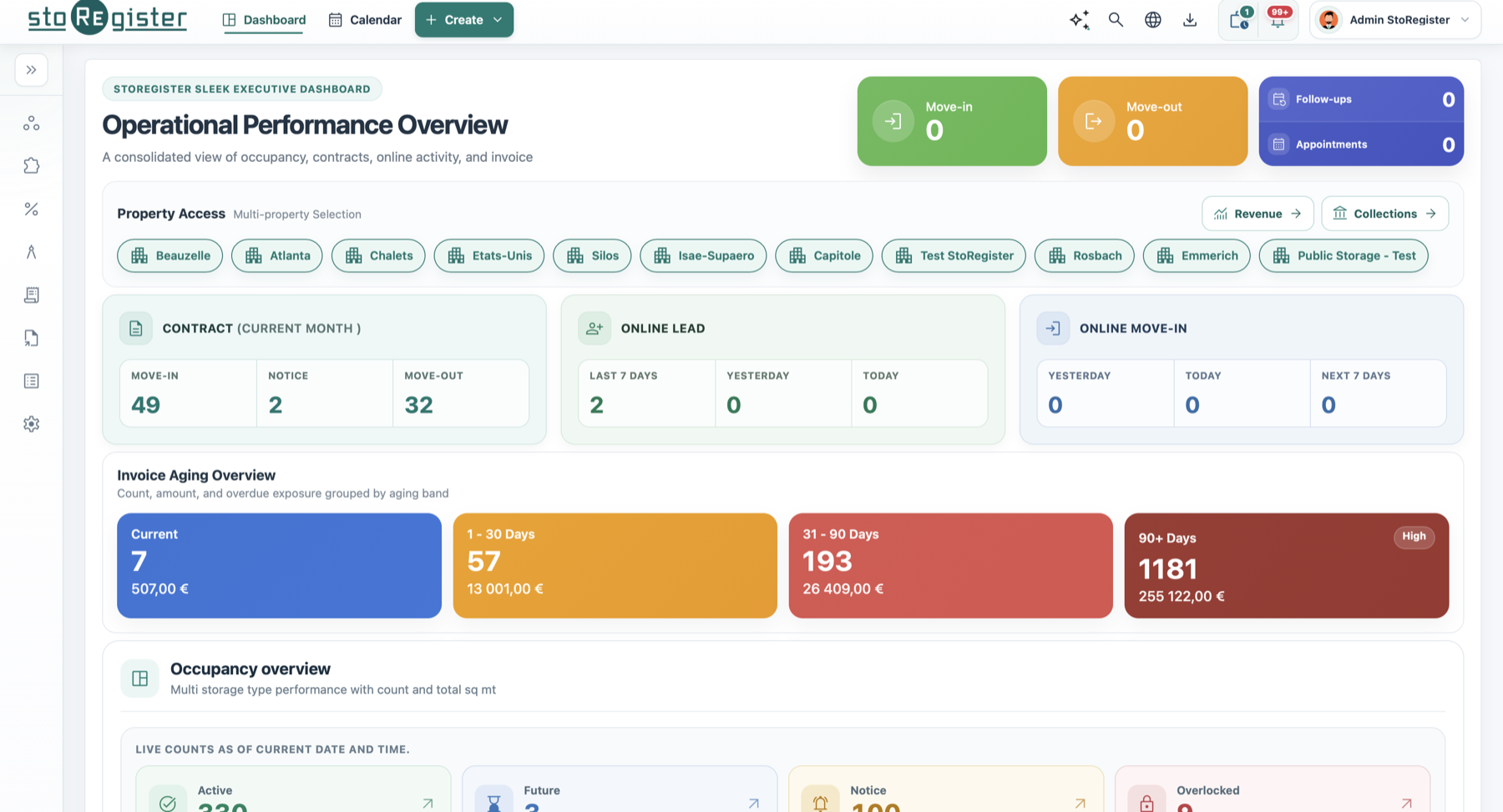
StoRegister Sleek self-storage management dashboard with the StoRegister Go operator mobile application
StoRegister connects the Sleek management dashboard and operator mobile experience across web, iOS and Android devices.
15,000+ storage boxesmanaged across customer operations, July 2026
Web, iOS & Androidoperator and customer channels
FEDESSA supplier memberindependent industry profile Regional or dedicatedAWS deployment options

Four connected product surfaces

What are StoRegister’s four core product surfaces?

Sleek, AI Genie, Mini Store and Open API are StoRegister’s four core product surfaces. Together they connect operator work, AI-assisted navigation, customer journeys and approved integrations. Separately scoped applications such as SafeRegister extend the suite where required.

AI Genie

Ask natural-language questions inside Sleek Web, receive contextual explanations and open the relevant application screen.

  • Inside Sleek Web
See AI Genie boundaries
Presenter introducing the AI Genie assistant inside StoRegister Sleek

Mini Store

A configured customer route for discovery, booking, move-in, payments and tenant account access across supported channels.

  • WordPress
  • iOS
  • Android
Review customer journeys
StoRegister Mini Store customer booking and tenant portal on web and mobile

Open API

Extend approved booking experiences and integrations through documented API use cases with agreed commercial, security and testing boundaries.

  • Approved use cases
  • Separate scope
Open API documentation
Open API integration visual connecting approved systems to StoRegister

Run the operation

Move from enquiry to move-out without losing context.

Sleek keeps the commercial and operational record together, so teams can follow the same customer from the first enquiry through quotation, contract, occupancy, billing, transfer and move-out.

  • Contacts, enquiries, leads and quotations
  • Reservations, move-ins, contracts, transfers and move-outs
  • Multi-property access, roles, tasks and team permissions
  • Documents, communications and activity history
Explore StoRegister management software
StoRegister contact and enquiry management workspace
One operational record across contacts, facilities, rentals and activity.
StoRegister Mini Store booking and tenant portal across web and mobile
Mini Store connects online discovery, booking and tenant self-service.

Sell storage online

Give customers a clear path from availability to account access.

Mini Store supports customer-facing booking through a WordPress Plugin, iOS app and Android app, while approved custom portals can be built around StoRegister's controlled Open API capability.

  • Configured unit discovery, current availability and eligible pricing
  • Reservations, rental checkout, promotions and add-ons
  • Identity, agreement, payment and move-in steps
  • Tenant contracts, mandates, ledger, documents and profile access

Available workflows vary by channel, plan and configuration.

Get paid and stay in control

Keep pricing, billing, collections and e-invoicing connected to the rental.

StoRegister keeps commercial events tied to the tenant and contract, from rate configuration and tax to invoices, payments, credits, refunds and provider-specific fiscal workflows.

Pricing & revisions

Configure rental rates, deposits, fees, insurance, services, promotions and effective-dated revisions.

Billing records

Create invoices, credit notes, receipts, charges and refunds against the relevant customer and rental.

Payments & collections

Support approved payment methods, recurring mandates, reminders and overdue follow-up workflows.

Country-specific e-invoicing

Connect available local providers or assess a custom integration when documented Open API access is suitable.

E-invoicing availability and compliance responsibilities depend on the country, provider, API capability and agreed scope. StoRegister confirms technical scope; customers should confirm their legal obligations with qualified advisers.

Mobile apps that extend the journey

Two mobile journeys, each with a clear job.

The mobile experience is split by purpose. Sleek Mobile is for approved operators who need controlled access away from the desk. Mini Store Mobile is for customers who want booking, payment and account access without waiting for office hours.

Operator mobility

Sleek Mobile for iOS and Android

Give approved team members a focused mobile route into operational work through the StoRegister Go operator app: follow-ups, contacts, bookings, move-in activity, tenant context and facility signals.

iOS app Android app Registered devices
Back office signal On-site action Same Sleek record
01 Check today

Review follow-ups, bookings, move-in activity and tenant context while away from the office.

02 Act on site

Keep operational decisions connected to the same Sleek record used by the back office.

03 Return cleanly

Mobile activity feeds the same customer, rental and facility history for the wider team.

StoRegister Go mobile dashboard showing operational counts, property access and contract activity
Sleek Mobile Operational pulse and portfolio context on a registered device
Customer self-service

Mini Store Mobile for iOS and Android

Give tenants a branded route to discover units, book storage, complete move-in steps, pay invoices and access documents without needing the back office.

iOS app Android app WordPress Plugin
Discover storage Book and move in Self-serve account
01 Find storage

Customers browse unit options, availability, property details and booking routes.

02 Complete move-in

Identity, agreement, document and payment steps can be guided before arrival.

03 Self-serve later

Tenants return for invoices, documents, account details and selected service actions.

Mini Store mobile booking screen showing property discovery and storage type selection
Mini Store Mobile Discovery, booking and tenant self-service in one focused journey

Guide the tenant journey

Guide identity, agreement and payment steps in sequence.

Guided tenant workflows let the team send controlled, time-limited links for the exact action a tenant or alternate contact needs to complete, without asking them to navigate the full back office.

  • Identity and KYC document collection
  • Declarations, lease review and electronic signing
  • Payment mandate and transaction steps
  • Task-specific links with controlled expiry
01
VerifyIdentity and required documents
02
AgreeDeclarations, lease and e-signature
03
PayMandate or approved payment step
04
Move inComplete the agreed tenant workflow
StoRegister interactive self-storage facility site map
See box status and facility layout in an interactive operational map.

Understand performance

Turn inventory and operating data into usable decisions.

Give facility teams the detail needed for daily work and leadership the wider view needed to understand occupancy, revenue, activity and risk across one property or a portfolio.

  • Box types, dimensions, status, pricing and availability
  • Interactive facility and unit maps
  • Occupancy, move-in, move-out and online activity views
  • Revenue, invoice aging, payment and operational reports
Explore supported storage models

AI assistance inside Sleek

How does AI Genie help self-storage teams?

AI Genie lets users ask natural-language questions about customers, invoices, contracts, reports and other data available inside StoRegister. It explains the result and guides the user to the relevant Sleek screen to verify details and continue the workflow.

Find a customer Explain an invoice Open a turnover report

AI Genie is designed to work against records held in StoRegister; the question is interpreted to return context. Confirm the configured processing boundary during evaluation.

AI Genie supports navigation and understanding; users remain in control of operational decisions.

StoRegister Sleek dashboard with AI Genie open for questions about self-storage application data
StoRegister AI Genie question panel with shortcuts for contacts, invoices and turnover reports

Operating model configuration

Configure StoRegister for your operating model.

Explore six capabilities that help self-storage teams structure portfolios, segment customers, control commercial changes, localize each market and connect approved financial and access providers.

Configuration should follow the operation. Business rules, markets and provider scope stay explicit as the portfolio grows.

01 Portfolio structure

Manage multiple facilities under multiple business names.

Operate several self-storage businesses, properties and facilities in one controlled environment. Associate each business name with the relevant property, facility, level or storage unit.

Multiple businesses Multi-facility view Scoped associations
One sign-in for a clearly structured portfolio
StoRegister structure for managing multiple self-storage facilities under multiple business names
Portfolio control Business, property and facility structure
02 Customer model

Configure customer segments and eligibility rules for each market.

Classify customers as personal, business, student, charity, military or another configured segment, then align eligible rental rates, insurance and services with that segment.

Customer segments Segment-aware pricing Eligible services
Relevant offers without duplicating the rental process
StoRegister configurable user types for personal, business and other self-storage customers
Customer segmentation User types, rates and services
03 Commercial control

Schedule revisions of prices and tax rates.

Prepare changes to rental prices, insurance, services and tax rates in advance. Effective dates and retained revision history support controlled operational and accounting review.

Effective-dated changes Price and tax control Revision history
Commercial updates prepared before they take effect
StoRegister effective-dated revision of self-storage rental prices, service costs and tax rates
Commercial governance Price, service and tax revisions
04 Market readiness

Localize StoRegister for supported operating markets.

Configure supported languages, currencies, date and number formats, time zones and market-specific workflows so teams and customers work in a familiar experience.

Languages and formats Currency and time zone Market workflows
One platform presented appropriately in each market
StoRegister localization for supported languages, currencies, formats and time zones
Localization Familiar experiences across markets
05 E-invoicing integration

Connect country- and provider-specific e-invoicing.

Use available e-invoicing integrations, or assess a custom connection when the local provider offers suitable documented Open API access. Final availability and compliance scope are confirmed for each market.

Country and provider scope Open API assessment Status and audit context
Invoice data prepared for the agreed local handoff
E-invoicing Country- and provider-specific integration
06 Connected infrastructure

Connect payments and bridge facility access through SafeRegister.

Connect supported payment gateways. For facility access, use the separately priced SafeRegister application to bridge approved StoRegister workflows with compatible third-party platforms. Nokē Smart Entry, PTI Security Systems / StorLogix, sedisto and Sensorberg One Access are compatibility-review starting points. CSI can enter that review only after its exact provider and product identity is confirmed. StoRegister does not supply access-control hardware; compatibility and software configuration are confirmed for each provider and facility.

Payment gateways SafeRegister software bridge Provider-owned hardware
A connected operating model configured for each facility
StoRegister payment gateway configuration and SafeRegister software bridge to supported third-party access-control platforms
Approved integrations Payments and SafeRegister software bridge

Connect the ecosystem

Fit StoRegister into the systems and markets you operate.

Connect supported providers, use SafeRegister for access-control bridging, scope controlled API use, localise the experience and choose a deployment model that matches your portfolio and data-location requirements.

Separately priced application

SafeRegister bridges StoRegister workflows to supported access-control platforms.

Use SafeRegister to connect approved software workflows with compatible third-party systems. Nokē Smart Entry, PTI Security Systems / StorLogix, sedisto and Sensorberg One Access are compatibility-review starting points. CSI can enter that review only after its exact provider and product identity is confirmed. Provider, product version, API or configuration route and facility scope are verified before implementation.

Explore SafeRegister
StoRegister supplies SafeRegister software bridge and agreed software configuration
Access-control provider supplies Gates, controllers, readers, installation, hardware licences and hardware support

Payments & e-signature

Connect approved payment, mandate and electronic-signature providers used in the relevant market.

Accounting & e-invoicing

Assess accounting, fiscal and country/provider-specific e-invoice connections for the agreed scope.

SafeRegister access-control bridge

Connect supported access workflows through the separately priced SafeRegister application. Access-control hardware remains within the selected provider's scope.

Explore SafeRegister

Controlled Open API

Build approved booking experiences and integrations around documented, agreed use cases.

Localization

Configure languages, currencies, taxes and operating details for supported applications and markets.

Identity & deployment

Plan SSO, regional AWS deployment or dedicated hosting in a customer-preferred AWS Region.

Evidence-led evaluation

Verify the workflows and boundaries that matter before you choose.

A credible software decision connects the feature list to your facilities, markets, channels and providers. Use a scoped walkthrough to confirm what is standard, configurable, integrated or separately delivered.

  1. 01
    Map the operating scope

    Document facilities, storage models, customer segments, roles, languages and required channels.

  2. 02
    Run representative workflows

    Test an enquiry-to-move-in journey, a billing exception and a portfolio-to-site action using realistic scenarios.

  3. 03
    Prove dependencies

    Confirm source access and data quality, accepted migration fields, payment and access providers, e-invoicing, API use, identity and deployment requirements.

  4. 04
    Freeze the adoption plan

    Record applications, channels, fees, migration or setup scope, responsibilities, acceptance, go-live evidence and post-launch support boundaries.

Implementation designed for confident daily use

Start with agreed business data or move from an existing platform. StoRegister can prepare the account, configure selected applications and compatible integrations, support go-live readiness, and guide agreed users at their own pace after launch. Assistance requests can be raised 24/7; the proposal and applicable agreement define scope, fees, channels, response and resolution targets, acceptance and the service endpoint.

Review implementation and migration

Capability index

The operational detail behind the platform.

Use this index as a starting point. A StoRegister evaluation confirms the exact applications, channels, integrations, limits and implementation scope for your facilities.

Swipe or use the arrow keys to compare all capability columns.

StoRegister capability areas, coverage, primary product surface and scope boundary
Capability What it covers Primary surface Confirm during evaluation
Sales & relationships Contacts, enquiries, leads, quotations, follow-up and communication history. Sleek Web and Mobile Roles, stages and team workflow.
Rental lifecycle Reservations, allocations, move-in, contracts, transfers, amendments and move-out. Sleek and Mini Store Channel, document and approval flow.
Inventory & pricing Properties, facilities, levels, storage units, maps, rates, fees, tax and revisions. Sleek and Mini Store Storage model, segment eligibility and market rules.
Finance & control Invoices, credit notes, receipts, refunds, mandates, reminders, collections and reports. Sleek Payment, accounting and e-invoicing provider scope.
Mobile operations Authorised operator access to selected contacts, bookings, activity and facility signals. Sleek Mobile Operating system, registered devices and plan allowance.
Customer self-service Discovery, availability, reservation, rental, payment, contracts, ledger and documents. Mini Store WordPress, iOS, Android and configured journey.
Facility access bridging Approved software workflows connected to supported third-party access-control platforms. SafeRegister Separate SafeRegister subscription, provider compatibility and software configuration. Hardware, installation, hardware licences and hardware support remain with the access-control provider.
Platform & governance Users, roles, property access, portfolio reporting, localization, SSO, deployment and API use. Sleek and Open API Market, provider, security and project boundary.

Feature questions

Clear answers before you evaluate.

Use these answers to frame the evaluation, then confirm the exact plan, channel, provider, market and implementation scope in the proposal and applicable agreements.

View all FAQs
What self-storage management features does StoRegister include?

StoRegister covers contacts and enquiries, storage inventory and availability, quotations, reservations, move-in and move-out, contracts, billing, payments, reporting, multi-property access, operator mobile workflows and customer self-service. AI-assisted navigation, integrations, localization and deployment options are added according to the agreed scope.

How are Sleek, AI Genie, Mini Store and Open API different?

Sleek is the operator workspace. AI Genie sits inside Sleek Web to help users ask questions, understand available application data and continue in a relevant screen. Mini Store provides configured customer booking and tenant self-service journeys. Open API supports approved portals and integrations within separately agreed commercial, security and testing boundaries.

What is AI Genie, and which decisions remain with the user?

AI Genie uses natural-language questions to retrieve and explain data available in Sleek, then guides the user to a relevant screen for verification and action. It does not replace operational decision-making. The configured processing boundary and applicable processor or subprocessor roles should be confirmed in the relevant security and data-processing documentation.

Which StoRegister features are available on web, iOS and Android?

Sleek Web supports the broad operator workspace, while Sleek Mobile, presented as StoRegister Go in the operator app, provides selected registered-device workflows on iOS and Android. Mini Store can provide WordPress, iOS and Android customer journeys. Exact screens and actions vary by application, plan, operating system, market and configuration.

Can StoRegister support multi-site operations and different storage models?

StoRegister supports multi-property access, portfolio reporting, configurable roles and facility-level workflows. The platform can be evaluated for unit, container, garage, boat and RV, wine-cellar, mailbox, document, warehouse and pallet-storage operations; inventory fields, journeys and integrations are confirmed for each model.

Does StoRegister support country-specific e-invoicing?

StoRegister supports available country- and provider-specific e-invoicing integrations and can assess a custom connection when a provider offers suitable documented API access. Technical availability and legal responsibility depend on the country, provider, API capability, customer role and agreed project scope.

Which integrations can connect with StoRegister?

StoRegister can connect with supported payment, mandate, e-signature, accounting, CRM, fiscal, e-invoicing and smart-storage providers. Access-control connections use the separately priced SafeRegister software bridge. Nokē Smart Entry, PTI Security Systems / StorLogix, sedisto and Sensorberg One Access are compatibility-review starting points. CSI can enter that review only after its exact provider and product identity is confirmed. StoRegister does not supply access-control hardware; every provider and facility scope is confirmed before implementation.

What is SafeRegister, and does StoRegister supply access-control hardware?

SafeRegister is a separately priced StoRegister application that bridges approved StoRegister workflows with supported third-party access-control platforms. Nokē Smart Entry, PTI Security Systems / StorLogix, sedisto and Sensorberg One Access are compatibility-review starting points. CSI can enter that review only after its exact provider and product identity is confirmed. StoRegister supplies the SafeRegister software and agreed software configuration, not gates, controllers, readers or other access hardware. Hardware procurement, installation, hardware licences and hardware support remain with the selected access-control provider. Compatibility and scope are confirmed for each provider and facility.

How does StoRegister approach data location, access and deployment?

StoRegister offers regional AWS deployment planning through Paris, Ohio, the UAE and Sydney, plus dedicated hosting in a customer-preferred AWS Region for agreed requirements. Region selection alone does not establish legal compliance; access controls, transfers, retention, customer responsibilities and contractual safeguards must be reviewed for the deployment.

What should implementation, migration, training and support cover?

StoRegister can scope two routes: first-system implementation using agreed setup information, or migration from another platform using an agreed supported data set. The service can cover application and compatible-integration configuration, migration rehearsal and reconciliation where applicable, user acceptance, training, go-live readiness and paced adoption guidance. Assistance requests can be raised 24/7 after go-live, and guidance may continue for several months or, where agreed, up to one year. Source access, data quality, mapping, fees, channels, staffed coverage, response and resolution targets, responsibilities, acceptance and the service endpoint are defined in the proposal and applicable agreement.

How are pricing and evaluation scope determined?

Pricing and evaluation depend on the selected plan, facilities, applications, operator devices, customer channels, integrations, migration, hosting and implementation requirements. Trial or evaluation access is considered for qualified businesses after a requirements review; the resulting proposal records inclusions, dependencies and exclusions.

See the right workflows

Build a StoRegister walkthrough around your operation.

Tell us about your facilities, first-system setup or existing-platform migration, Sleek operator access, Mini Store customer channels, SafeRegister access-control bridging, e-invoicing, integrations and deployment requirements.